iOS Asset Catalogs Are Coming to React Native


In the fall of 2020, I was building an App Clip. If you haven't had the pleasure: an App Clip is a miniature version of your app that launches instantly from a QR code or a link, and Apple enforces the miniature part with an app bundle size budget. Back then that budget was 10 MB after thinning (Apple has since loosened it to 15 MB, or 100 MB on iOS 17+ if your Clip is only launched digitally).
The app was built with React Native, and 10 MB is not a lot. For scale, I built today's React Native hello world while writing this: Release, arm64, no features, no images, no product. The app bundle came out at 10.6 MB, and Hermes is 4.8 MB of that. An empty React Native app in 2026 misses the 2020 App Clip budget on its own. It was leaner back then, to be fair: iOS ran JavaScriptCore, a system framework that costs zero bundle bytes, and the New Architecture didn't exist yet. But the floor was high enough that every megabyte I could find mattered, so I went hunting for ways to shrink the bundle. Poking through the built .app, I noticed the images: every asset the app require()s was copied in as loose files at every scale it ships, 1x, 2x, and 3x. A 3x phone will never draw the first two, so two of the three scale variants were dead weight, and app thinning, the mechanism that's supposed to strip unused scales, can't touch loose files. That sent me researching how native apps handle assets, and the answer was: asset catalogs.
In an asset catalog, images are organized by scale and given a unique identifier that can be referenced in code later. They then get compiled into a single indexed file, memory-mapped at runtime instead of split across the filesystem, and sliced per device at download time so we don’t ship scales a phone can't draw. All of it built to make asset loading as efficient as possible, but none of it applied to React Native's images.
I started working on this, shipped it in my RN fork, and opened PR #30129 upstream, but I never finished addressing the review feedback and it stalled short of merging.
Since last year I've been back consulting at App & Flow, where open source is part of what I do. Eventually I got back to this PR. Some parts had to be reworked, and it ended up as a much better design than my original. What follows is how it works, from the CLI down to the image loader.
How images load today
It starts at build time. When Xcode runs the "Bundle React Native code and images" phase, the CLI asks Metro for every image the app require()s and copies each one into the app bundle as individual files, one per scale: img/logo.png ships as assets/img/logo.png, assets/img/logo@2x.png, and assets/img/logo@3x.png, sitting next to the JS bundle.
At runtime, when the app loads an image via require('./img/logo.png'), it calls [UIImage imageNamed:] with the bundle-relative path. The scale is already resolved on the JS side, so the name arrives with the scale suffix and extension already attached (assets/img/logo@2x.png), and UIKit goes hunting through the bundle for a file matching it.
Meanwhile, at Apple, thirteen years ago
Xcode 5 shipped something called an asset catalog. It is an .xcassets directory, one .imageset folder per image, each holding the image files and a Contents.json:
{
  "images": [
    {"filename": "logo.png", "idiom": "universal", "scale": "1x"},
    {"filename": "logo@2x.png", "idiom": "universal", "scale": "2x"},
    {"filename": "logo@3x.png", "idiom": "universal", "scale": "3x"}
  ],
  "info": {"author": "xcode", "version": 1}
}
The useful part happens at build time: a tool named actool compiles all of it into a single Assets.car, a binary archive with an index mapping each name to its renditions, the per-scale, per-idiom (iPhone vs iPad vs Mac), per-appearance variants of that image. At runtime, UIImage(named:) does a best-match over rendition attributes to a memory-mapped index of all images.
If you're curious what's inside one, xcrun assetutil --info dumps the inventory, one entry per rendition:
$ xcrun assetutil --info RNAssets.bundle/Assets.car
[
  { "Platform" : "ios", "PlatformVersion" : "15.1", "SchemaVersion" : 2, … },
  {
    "AssetType"     : "Image",
    "Name"          : "header",
    "RenditionName" : "header@2x.png",
    "Scale"         : 2,
    "Idiom"         : "universal",
    "Compression"   : "deepmap2",
    "PixelWidth"    : 160,
    "PixelHeight"   : 160,
    "SizeOnDisk"    : 830
  },
  …
]
Then there's the part that started this whole story: app thinning. When the App Store prepares your build for a specific device, catalog contents get sliced. An iPhone 17 downloads only the 3x renditions; the 1x and 2x bytes never leave Apple's servers. Loose files get no such treatment.
Every iOS app template since 2013 has an asset catalog. React Native apps have one too… for the app icon. Meanwhile, every image you actually require() sits outside it as loose files, unindexed and unsliced.
Two designs, six years apart
The 2020 version worked, but it made you do part of the work. You created an RNAssets.xcassets in your Xcode project by hand and committed it. You reordered your build phases so the bundle script ran before the catalog got compiled, since the script is what fills the catalog in. New apps needed a template change to get any of it.
Xcode also kept moving underneath it. By the time I came back, the asset-symbol generator that shipped in Xcode 15 formed a dependency cycle with that phase reordering, and breaking the cycle meant setting GENERATE_ASSET_SYMBOLS = NO on the whole target. That would have broken UIImage(resource:) for the app's own images. Dealbreaker here.
That is a lot of ceremony to ask of every app, and every step of it was a way for someone's build to go wrong. It's a big piece of why the PR stalled: the feature was fine, the migration was not.
So I threw the recipe out and went looking for a better one. This round I could iterate on designs with AI instead of prototyping each by hand, and the one that I ended up choosing stands out for how simple it is.
The idea is that React Native manages its own asset catalog. Nothing gets committed. No build phases move. Your app's own Images.xcassets (icons, launch images, UIImage(resource:) symbols) is never touched.
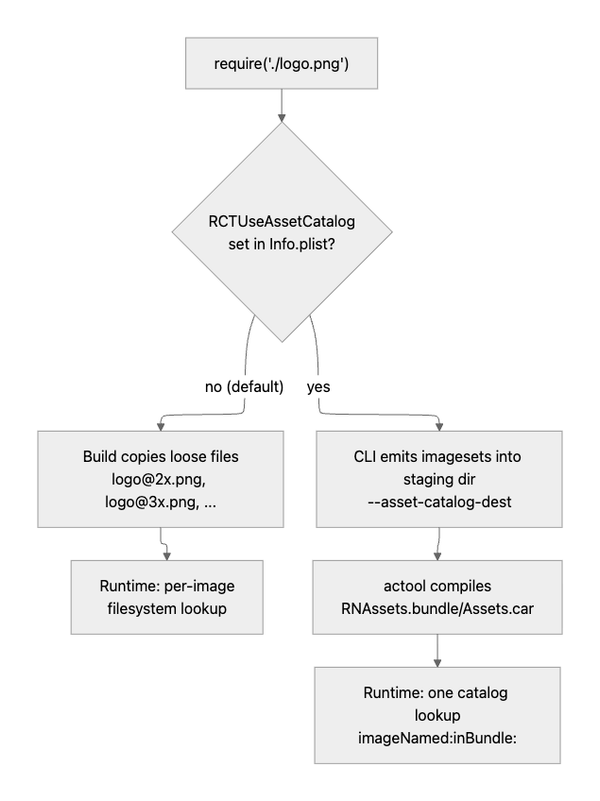
That leaves exactly one thing for an app to do: turn it on. The whole feature sits behind a flag, a single Info.plist key, so existing apps keep the old behavior until they opt in:
<key>RCTUseAssetCatalog</key>
<true/>
That's the entire migration. Getting there took three coordinated pieces: the CLI writes a catalog, the build compiles it, the runtime reads it.
Part 1: the CLI writes a catalog
Fun fact: this half of the feature merged into the CLI back in 2022, midway through the PR's sleep. It has shipped inside every React Native app's tooling since, dormant, waiting for a native side that never came. Nothing ever passed it the flag.
Here's what happens when something finally passes it. Given --asset-catalog-dest, saveAssets in @react-native/community-cli-plugin checks whether the asset is a png, jpg, or jpeg and routes it through getImageSet, which writes exactly the .imageset structure shown above, files copied in, Contents.json generated, one entry per scale. Everything else (gif, webp, fonts) takes the loose-file path, same as before.
That list maps to what an imageset will actually hold: gif and webp aren't valid imageset contents. Put a .gif in an imageset and actool responds "that file does not have a valid extension", leaves it out of the .car, and exits 0 anyway. Since the runtime does a catalog lookup and nothing else, a rendition that quietly failed to compile is a blank space on screen. So the CLI routes only the formats catalogs actually support, and everything else keeps shipping the way it always has.
The function that matters is the one that names the imagesets. Asset catalogs are a flat namespace; Metro assets live in folders. So the CLI flattens the path into an identifier:
function getResourceIdentifier(asset: PackagerAsset): string {
  const folderPath = getBasePath(asset);
  return `${folderPath}/${asset.name}`
    .toLowerCase()
    .replace(/\//g, '_')          // encode folder structure
    .replace(/([^a-z0-9_])/g, '') // drop illegal chars
    .replace(/^(?:assets|assetsunstable_path)_/, ''); // strip "assets_" or "assetsunstable_path_" prefix
}
img/logo.png → imageset img_logo. The scheme predates the feature; it's how Android has named RN's drawable resources all along.
Remember this function. The native side has to reproduce its output byte for byte, in a different language, from a different input.
Part 2: the build compiles it
react-native-xcode.sh sources a small new script, scripts/xcode/asset-catalog.sh. Its first job is deciding whether the feature is on, and it does that by reading RCTUseAssetCatalog out of the app's Info.plist.
If the key is on, the script stages an empty RNAssets.xcassets in a scratch directory under DERIVED_FILE_DIR, hands it to the bundler, and afterwards compiles it with actool into RNAssets.bundle.
The end result, in the built app:
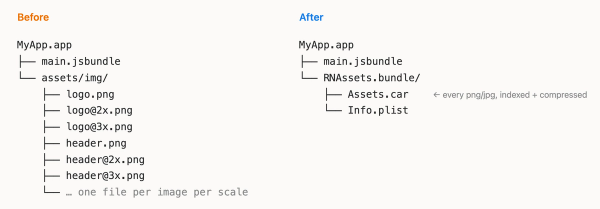
Non-catalog assets (gif, webp, fonts) still ship loose under assets/, same as before.
Part 3: the runtime reads it
The runtime side is three small functions in RCTUtils.mm.
RCTUseAssetCatalog() reads the plist key once, using dispatch_once. This is the feature flag. If it's on, the assets are in the catalog: the bundling script reads the same key.
RCTAssetCatalogBundle() resolves RNAssets.bundle once and caches it. If the bundle is missing, the loader logs an error and exits rather than passing a nil bundle to imageNamed:inBundle:, because nil there means "search the main bundle", which could resolve some unrelated image from the app's own catalog and put the wrong picture on screen.
Then the fun one. RCTAssetCatalogNameForURL takes
file:///.../MyApp.app/assets/img/logo@2x.pngand must produce img_logo: exactly what that JS regex chain produces, byte for byte, or the lookup misses. My 2020 version did the obvious port: split the path, run NSRegularExpression, lowercase, join. It works, but this is a pretty hot code path. This is 2026, so after adding a bunch of tests I had AI help me rewrite it around a stack buffer, avoiding the extra allocations. About 2.2× faster than the regex version, same output.
Now that we have the name, UIKit can resolve the image in the asset catalog of the RN bundle. One call, no need to handle the scale.
UIImage *image = [UIImage imageNamed:catalogName
                            inBundle:assetCatalogBundle
       compatibleWithTraitCollection:nil];
Not everything goes through this lookup. The loader only takes the catalog path for URLs that point inside the app bundle's assets/ folder with a png/jpg/jpeg extension. Everything else, like the gif and webp files that shipped loose, or assets delivered outside the main app bundle by OTA update systems, never matches that check and falls through to the regular loader, untouched. That's also why OTA updates just work.
The numbers
RNTester, Release build, cold first load, the same 11 images in both modes, instrumented directly at RCTImageFromLocalAssetURL. The median image resolved in 719 µs from loose files and 47 µs from the catalog, about 15× faster.
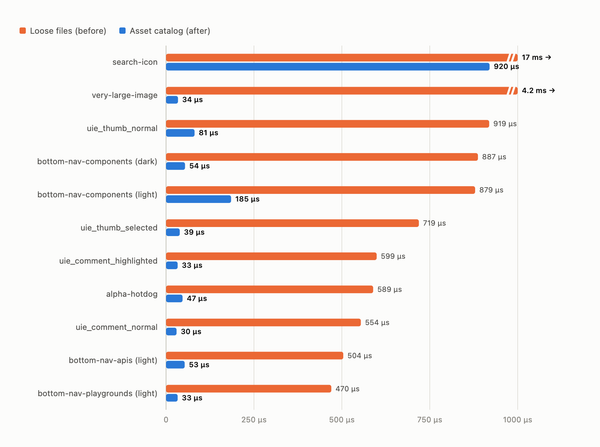
Note that what is measured here is the time to resolve and open each image, not decode it. Since asset catalogs are a single memory-mapped file, only the first load pays to map the index; after that a lookup is an index hit in the already-mapped file, while loose files pay a filesystem search on the first load of every image.
That leaves the other half of the load: the decode. Catalog renditions aren't PNGs. actool re-encodes each one into Apple's own format, the deepmap2 visible in the assetutil dump above, so decoding takes a different code path too. I measured that separately, outside React Native: the same 26 images shipped twice in one app, once as loose files and once compiled into a car, each loaded cold and forced through a full decode into an identical bitmap context.
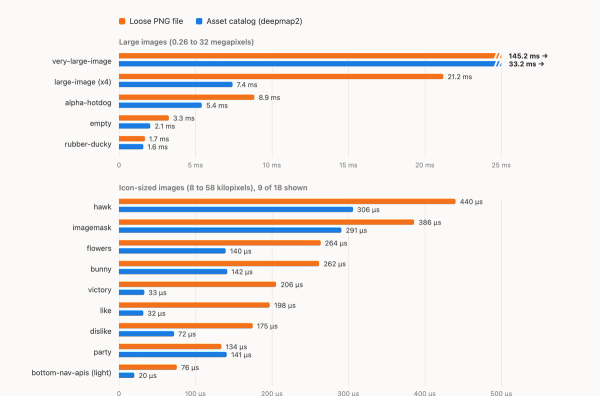
The catalog wins there too, and by more than it wins on lookup: 247 ms versus 74 ms to decode all 26 images, a median of 2.2× per image, rising to 2.9× on the multi-megapixel ones and 4.4× on a 32-megapixel PNG. Two of the smallest icons came out a wash; every other image decoded faster. That benchmark ran on the simulator rather than on a phone, so read the magnitudes as directional, but the direction is not in doubt: on image-heavy screens the decode saving is the larger half of the win.
What about Expo?
Expo apps bundle with expo export:embed instead of the React Native community CLI, so I checked whether any of this carries over. It turns out Expo's CLI already implements --asset-catalog-dest, imageset writing and all: the CLI half of the feature merged upstream in 2022, and Expo mirrored it when they built export:embed. And a prebuilt Expo app's bundle phase runs the same react-native-xcode.sh from React Native, just pointed at Expo's CLI. The whole pipeline is already wired, waiting on an SDK that targets React Native 0.88 or newer, the release this feature ships in (more on that below).
Once that ships, turning it on should be one entry in app config, no config plugin needed, since prebuild writes ios.infoPlist values into the generated Info.plist as the literal values the build script reads:
{
  "expo": {
    "ios": {
      "infoPlist": {
        "RCTUseAssetCatalog": true
      }
    }
  }
}
From there, Expo could flip it on for everyone by making the key a prebuild default, with ios.infoPlist as the opt-out. I haven't run an end-to-end Expo build yet, so consider this well-informed optimism rather than a promise.
Shipping in 0.88
We can now finally load local images the exact same way as native apps, without the Xcode drag and drop.
App thinning applies too: a thinned archive slices RNAssets.bundle exactly like the app's own catalog, so migrated apps stop shipping 1x and 2x bytes to 3x devices.
PR #30129: opened October 2020, merged July 23, 2026 as 26769a00b2. In between, React Native replaced its architecture, Xcode grew a new asset pipeline, and the implementation had to be reworked around both, coming out smaller than the original. Thanks to Pieter De Baets (@javache) for reviewing both iterations, six years apart, and for shepherding it through Meta's import.
It missed the 0.87 branch cut by two weeks, so it ships in React Native 0.88, opt-in. Enabling it by default for new apps is a follow-up in react-native-community/template.
As for the App Clip that started all this: it never shipped. The PR outlived the product that needed it.
If you find this interesting, this is the kind of work we do at App & Flow. We strive to push the boundaries of what is possible to do with React Native.