Introducing Stim: React Native environments for coding agents


Coding agents can write great React Native code. Getting that code built and running still takes work: starting Metro, choosing a device, waiting for native builds, and figuring out whether the app actually launched.
Most of that tooling assumes a developer is there to answer prompts and manage the environment. Add multiple agents working in separate checkouts, and they can end up fighting over the same port or simulator, or compiling the same native app again.
At App & Flow, we built Stim to make that part easier. It’s an open-source CLI that gives coding agents isolated React Native environments, with shared build caches that work across worktrees and an interface designed for unattended use.
What Stim handles
- Separate environments for parallel work. Each workspace gets its own Metro port and simulator. Agents can work on different changes without connecting to another checkout’s dev server or taking over its device.
- Reuse instead of rebuilding. When native inputs match, Stim can install an existing app build in a new worktree. It also shares compiler and Metro caches, so creating a separate checkout doesn’t mean starting all the expensive work over.
- Useful feedback for the agent. Non-interactive commands report the device, app, build, and launch state. Focused errors and logs help the agent find what went wrong without reading an entire build transcript.
- Cleanup when the task is done. Stim tracks the resources it creates and provides commands to release them, without deleting your own simulators or emulators.
Stim works with React Native Community CLI and Expo projects on iOS and Android. Builds run locally, using your existing development setup. It doesn’t replace your coding agent or device automation tools; it handles the environment they need to build, launch, and inspect the app.
The simulator can also run remotely through EAS Simulator, in early access. Stim builds the app locally, connects it to the remote environment, and manages the session’s lifecycle. This keeps the simulator off your machine while preserving the agent’s build-and-check workflow.
From a code change to a checked result
Say you ask an agent to fix a screen in a separate worktree and show you that it works. The agent creates the checkout, then uses Stim to prepare its environment and launch the app on its own simulator. If a compatible native build already exists, Stim reuses it.
Once the app is running, the agent can use a device automation tool such as agent-device to navigate to the screen, check the change, and capture a screenshot or recording. The agent can then open a PR with that proof. Stim handles the build and launch; the agent still needs to verify the result. Another agent can work on a different task at the same time without sharing that environment.
What we saw in practice
We recorded the same JavaScript change task with GPT-5.6 Sol on one M4 Mac mini with 16 GB of memory: create a new worktree, make the change, launch the iOS app, and verify the updated screen.
The run using Stim reached screenshot proof in 2m14s, compared with 10m11s using local Expo and Apple tooling. Both started from a built main checkout and carried existing dependencies and native outputs into the new worktree. Stim also reused its cached native app and a parked simulator.
Timings start at the first recorded agent activity and end at the verified screenshot, excluding runner startup and initial reasoning before that activity. The video aligns two separately recorded runs on that clock, with waiting sped up. Vanilla is on the left; Stim is on the right.
We also tested native changes and launch errors. In the recorded GPT-5.6 Sol iOS native-change comparison, Stim reached screenshot proof in 4m10s versus 12m1s. In the iOS launch-error comparison, the agent had to diagnose an injected error, fix it, and verify the repaired screen: 3m18s with Stim versus 11m54s with local tooling. On Android, the same model completed launch-error recovery in 3m04s with Stim versus 9m02s with local tooling. These include the work from the first recorded agent activity through verification, not just compilation or the first error message.
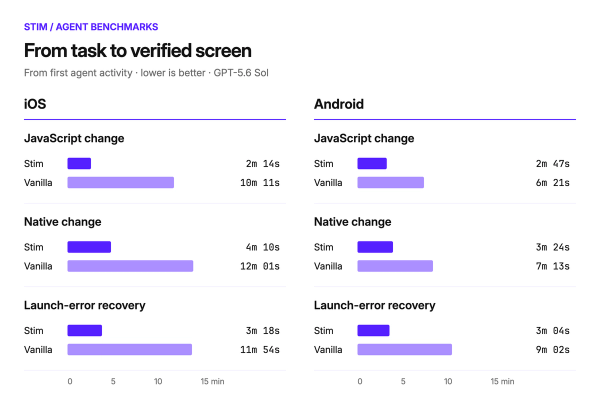
The benchmark viewer includes the methodology, command logs, and proof.
Who it’s for
Stim is most useful when agents regularly create worktrees, run in parallel, or need to build and validate changes. If you work in one checkout with an already-running Expo development client and rarely change native code, your existing workflow may be enough.
Stim is available as an open-source release. Add the CLI and agent skill, then ask your agent to build and run the app.
We’d love to hear where it helps—and where your agent still gets stuck.