Building the Offline-First App Behind 3 Million Check-Ins at Fortune 500 Events


Built with the Swoogo team, Go Onsite has powered 3 million+ check-ins since launch. This is how we kept it working when the venue Wi-Fi didn't.
When staff scan tickets at an event, every scan affects the person standing in front of them and everyone waiting behind them. The result needs to feel immediate. Waiting for a server response can slow down the line and make check-in frustrating for both attendees and staff.
Our check-in devices relied on venue Wi-Fi. We could control the app and the backend, but not the connection between them. A healthy backend does not help when the device cannot reliably reach it. Cellular data does not eliminate this problem either: in a crowded venue, congestion can make a device that appears connected effectively offline.
With a reliable connection, the app could send each check-in to the backend and update the UI after receiving a response. Supporting that same workflow offline required a different approach: record the check-in locally, reflect it in the UI immediately, and synchronize it later.
A first approach would be to cache API responses so previously loaded data remains available offline. But supporting the full workflow required more than cached results. Finding an attendee and checking their check-in status required the underlying records and the ability to query and combine them locally.
Keeping those workflows usable offline also meant thinking beyond data storage. We also had to decide how changes would reach the backend and what staff would see while the connection was unavailable.
Deciding What Works Offline
We started with the goal of making the whole app work offline. As we worked through the workflows, we found exceptions. Some actions could finish locally and synchronize later. Others needed a live connection.
Check-ins could be recorded on the device and sent to the backend later, allowing staff to keep admitting attendees without waiting for connectivity to return.
Payments still needed a live connection. The app had to wait for the payment provider to confirm that the transaction was approved before showing it as successful.
For each workflow, we had to decide whether it could work offline and what local data it would need. When a connection was necessary, we also had to handle its absence: block the action and clearly explain why it was unavailable.
The Check-In Flow
The local-first check-in flow looked roughly like this:
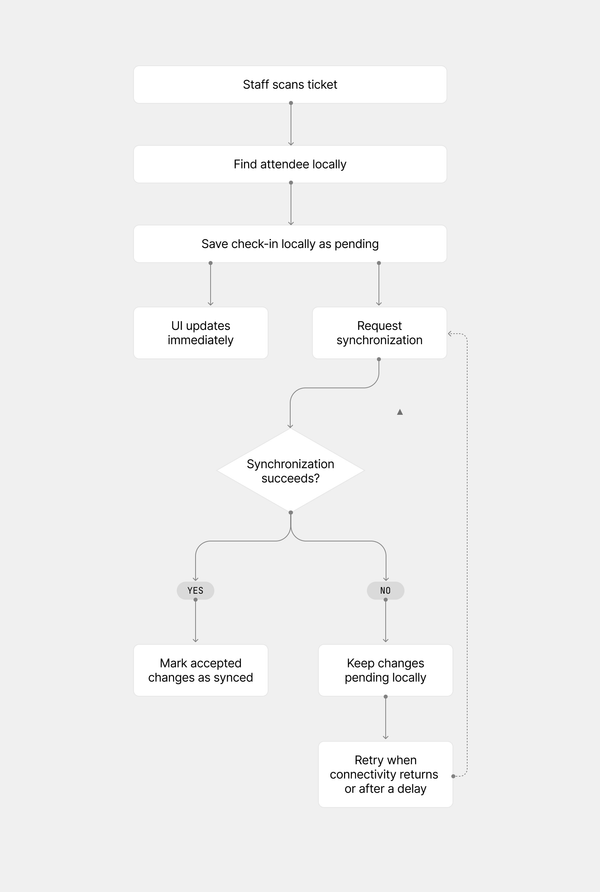
Staff could continue checking people in as soon as each check-in was saved on the device. Synchronization usually completed within seconds. If check-ins remained unsynchronized for too long, a banner appeared throughout the app to let staff know their work had not yet reached the backend.
The sequence is what made the flow local-first:
- Write locally.
- Let the UI react to local data.
- Sync in the background.
Local-First Adds to the Frontend’s Job
I was used to screens requesting data from the backend and displaying the response, sometimes keeping a cached copy for later. Here, the device needed enough underlying data to answer new searches and filters without another request. I had to start thinking in terms of local queries when building a screen. The local database became the source of truth for the UI, whether the device was online or offline. Screens read from it through shared queries, while synchronization kept it updated in the background.
We stored events, attendees, and check-ins in separate local tables. The app could then query and combine those records to build the lists and counts staff needed.
For example, to show who was checked in to an event, the app matched that event's check-in records with the corresponding attendees. An attendee's name came from one table; whether they were checked in came from another. The device could produce that list without asking the backend to calculate it.
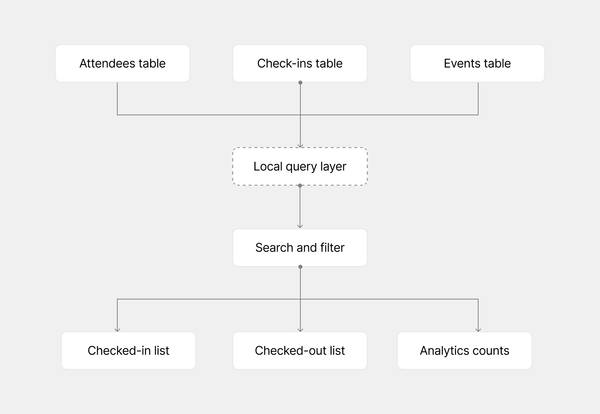
When staff recorded a check-in, the app wrote it to the local check-ins table. The query layer observed that change and updated its results, which refreshed the attendee list and check-in count on screen. Changes received through synchronization updated the same local tables and reached the UI through the same path.
We put shared queries and business rules in services and hooks so individual components didn’t have to repeat the logic for matching records or filtering attendees. This gave screens a consistent way to read and update local data.
The local records did not have to match the backend’s format exactly. When needed, we could transform incoming data during synchronization, either to meet the local database’s requirements or to make it easier for the frontend to query. Outgoing changes could also be converted into the format the backend accepted. Keeping any necessary conversions in the synchronization layer gave the rest of the app a consistent model to work with, without each screen or query needing to interpret the backend’s format.
Before an event could be used offline, we first had to load its required records onto the device. We marked the event as offline-ready only after all that data had been downloaded and stored locally.
Keeping Track of Unsynced Changes
Saving a change locally was only the first step. The app also needed to remember which changes had not yet reached the backend. We used WatermelonDB as our local database, and it tracked those changes through each record’s synchronization status.
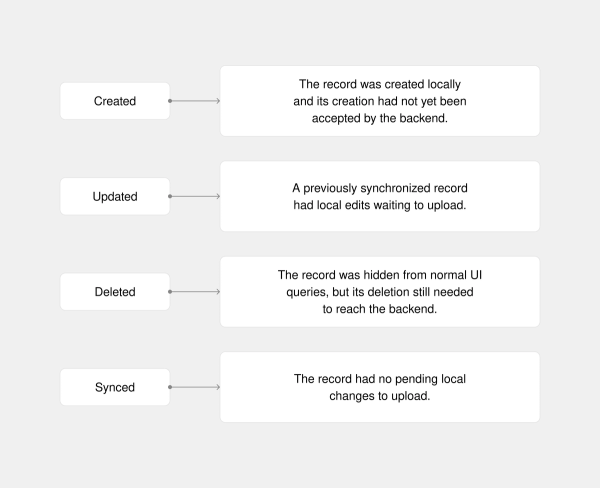
For example, a new check-in record had a status of created until the backend accepted it. Editing a previously synchronized record changed its status to updated. If an upload failed, those changes remained local for a later retry.
Deletion needed an intermediate step. In our app, a record marked as deleted disappeared from normal UI queries but remained in the local database until its deletion had been accepted by the backend. Only then could it be removed permanently from the device.
Deletion followed this sequence:
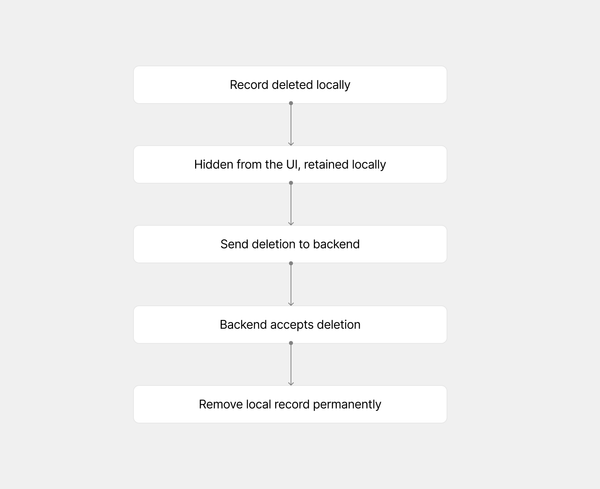
If synchronization fails, the record stays marked for deletion until a later attempt succeeds.
These statuses described pending local work. A record marked as synced could still have a newer version on another device or the backend that this device had not received yet.
Other sync engines may track pending changes in a separate operation queue or replication metadata instead of a status on each record. They may also store a pending deletion separately from the original row. Either way, the system needs to remember what changed until it has been synchronized.
Local creates, edits, and deletions triggered synchronization so those changes could reach the backend. When backend data changed through another device, an admin panel, or a backend process, a notification prompted the app to fetch the updated records. The notification itself only signaled that something had changed; synchronization updated the local database.
If a request arrived while synchronization was already running, the app remembered to run another pass afterward.
Handling Conflicting Changes
Two devices can update the same record before either receives the other’s changes. If they change an attendee’s name differently, the synchronization process needs a rule for deciding which value to keep. One approach is to compare when each edit happened and keep the most recent. But that only works if “most recent” describes the value we actually want to preserve.
Each operation carried a timestamp recording when it happened on the device, regardless of when it synchronized. Imagine one device checks in an attendee at 12:00 while offline. Another checks in the same attendee at 13:00 while online. When the offline device reconnects, the backend has two check-in operations to reconcile: one from 12:00 and one from 13:00.
For the attendee’s current check-in status, we used the most recent operation. If an offline check-out happened after the check-in known to the backend, that newer check-out needed to take precedence when it synchronized.
For “checked in at,” we deliberately preserved the first arrival. In the example above, that meant keeping 12:00, the attendee’s earliest check-in, rather than replacing it with 13:00. Checking out and returning later did not replace that first-arrival timestamp. The backend retained the check-in and check-out history, allowing it to preserve the first arrival time even when the local check-in record was deleted.
The latest operation could therefore determine the current status while an earlier operation determined the arrival time. Applying one “latest wins” rule to both fields would lose information we needed to keep.
That is the kind of rule you want to decide deliberately with backend and product people. Agree on what each field represents and how conflicting changes should be handled, then make those rules explicit in the synchronization logic.
Protecting Work That Hasn’t Synchronized
Changes saved on a device could still be the only copies until they reached the backend, so staff needed to know when their work had not yet synchronized.
We showed a banner across the app when synchronization failed to complete for much longer than usual. Staff could continue working locally, but the banner warned them that changes might not be reaching the backend or arriving from other devices. It gave them a chance to notice the problem and seek help.
We also checked for pending changes before destructive actions, such as resetting the local database. If anything remained unsynchronized, the app warned staff and asked for confirmation before proceeding.
What I Took From This
Building this app added another layer to my frontend work. I had to think in terms of screens reading and updating a local database, with synchronization happening in the background.
It also meant following each workflow beyond the moment something was saved locally. We had to think through how that work would reach other devices and how conflicting changes would be handled. We also had to keep those added constraints from creating unnecessary work for staff, while making it clear when a problem needed their attention.